Wednesday, May 22, 2013

របៀបកាត់បន្ថយ (ឬក៏បិទចោលតែម្ដង) នូវរូបភាពផ្សាយពាណិជ្ជកម្មរញ៉េរញ៉ៃ នៅពេលបើក ទំព័រអ៊ិនធើណេតម្ដងៗ


បើកគេហទំព័រអ៊ិនធើណេតមួយ ហើយត្រូវចំណាយទាំង Megabytes ហើយនិងពេលវេលា ដើម្បីអោយ Internet Browser បើកអោយចប់ចុងចប់ដើម... វាពិតជាគួរអោយធុញ...ធុញហើយខាតពេលវេលាមែនទែន! (លើកលែង តែអ្នកផ្សាយពាណិជ្ជកម្មចេញ)
តែចាំមួយភ្លែត... វាមិនមែនចុងបំផុតរបស់ពិភពលោកឡើយ just kidding :D នៅមានវិធីដើម្បីបិទរូបផ្សាយពាណិជ្ជកម្មអស់ទាំងនោះ។

Sunday, May 19, 2013

LG F100L/S Jellybean Upgrade, Root, Khmer Unicode and Clockwork Mod

Khmer version, click here.
UPDATE: Link is repaired. Thanks for the feedback. If you find dead link, please comment to let me know.

LG F100
For LG Optimus Vu F100L or S only. F100L is a Korean variant, and S is international variant. Your phone must have a battery that may last 1 hour or at least 20%. Rooting and changing system file void your warranty. I tested this on my LG Vu F100L and got success even on a repeated demo. However, I do not have guarantee for your phone if it bricks. Do it at your own risk. Anyway, if you do just exactly as I write here, I believe you will succeed.

UPDATE: If you already on official Jellybean 4.1.2, you can skip the upgrade and go straight to root.

Saturday, May 18, 2013

របៀប​ដំឡើង Andriod Jellybean 4.1.2, root ហើយ​និង​ តំឡើង​ យូនីកូដ​ខ្មែរ លើ​ទូរសព្ទ LG Vu F100L ឬ F100S


 English version, click here.

UPDATE: បើ​អ្នក​មាន Jellybean ហើយ,​ អ្នក​អាច​ចូល​ទៅ​ Root តែ​ម្ដង​ក៏​បាន។
UPDATE2: បើ​ពេល​ដំឡើង​វា​ទាមទារ​រក «B2C App» សូម​ចូល​ទៅ​ របៀប​ធ្វើ​ភាសាអង់​គ្លេស កន្លែង Alternative Method ខាង​ក្រោម​បំផុត។

LG F100
សំរាប់​តែ​ទូរសព្ទ LG Optimus Vu F100L S តែប៉ុណ្ណោះ។ F100L និង S គឺ​ជា​ទូរស័ព្ទ​ពីរ​ម៉ាក​តែ​មួយ​ គ្រាន់​តែ L គឺ​ជា​ប្រភេទសំរាប់​ប្រទេស​​កូរ៉េ, Sគឺ​ជា​ប្រភេទ​អន្តរជាតិ។ ទូរសព្ទ​ត្រូវ​មាន​ថ្ម​ដែល​អាច​នៅ​បាន​ប្រហែល​មួយ​ម៉ោង ឬ​យ៉ាង​ហោច​ណាស់​ក៏ 20% ដែរ។ ការ Root និង ដំឡើង​ System File គឺ​ជា​ការ​បំពាន​លើ​កិច្ច​សន្យា​ធានា​ទូរស័ព្ទ។ ខ្ញុំបាន​សាក​​លើ​ទូរសព្ទ LG Vu របស់​ខ្ញុំ ហើយ​បាន​ជោគជ័យ ទោះ​បី​ជា​ធ្វើ​ឡើង​វិញ​ច្រើន​ដង​ក៏​នៅ​តែ​ជោគជ័យ តែ​យ៉ាង​ណា​ក៏​ដោយ ក៏​ខ្ញុំ​មិន​ធានា​លើ​ទូរស័ព្ទ​អ្នក​ឡើយ បើ​សិន​គាំង​ទូរស័ព្ទ តែ​ខ្ញុំ​ជឿ​ថា​បើសិន​ជា​អ្នក​ធ្វើ​តាម​អ្វី​ដែល​ខ្ញុំ​បង្ហាញ​បាន​ដូច​១០០% នោះ​អ្នក​នឹង​មិន​ជួប​បញ្ហា​ឡើយ។

Monday, February 25, 2013

Unhide Files and Folders after infected by virus (One-click)

ចុចទីនេះ សំរាប់ជាភាសាខ្មែរ
Click here for a more detailed version

Then you know the consequence of virus, right? Everything got hidden and you can’t do anything about it. But I can!


And then I posted about a detail version of how to do this already. So now, it’s time for some instant cool trick.


Download:
Vann: Bulk Unhide File and Folder


What you have to do is just to download file above, put it in the folder that you want, and all files, folders INCLUDING subfolders will be unhidden. Double-click it. It takes seconds to minutes depending on how many files and folders you have. Then, voilà! Everything’s done!


HOW IT WORKS: If you put it in a folder, everything including files, folders and subfolders will clear Hidden and System attribute. How it works it that this file is a command line of “attrib -s -h *.* /d /h”. You can see it in detail here.

Sunday, February 24, 2013

Unhide Files and Folders after infected by virus (តែមួយឃ្លីក)

Click here for English
ចុចទីនេះសំរាប់ របៀបដែលលំអិតជាងនេះទៅទៀត

ក្រោយភ្លៀង មេឃស្រឡះ…តែប្រហែលជាត្រូវកើបភក់ច្រើនបន្តិចហើយ។ អ្វីៗដែលអ្នកឃើញគឺសុទ្ធតែ Hidden ហើយលក្ខណៈជា System ទៀតផង។ យ៉ាប់ជាងនេះទៅទៀតគឺអ្នកមិនអាចដាក់មិនអោយលាក់វិញបានឡើយ។ តែខ្ញុំដឹងថាត្រូវធ្វើយ៉ាងម៉េច!


ខ្ញុំបានសរសេរពីរបៀបដក Hidden ចេញ របៀបលំអិត ហើយពិបាកបន្តិច រួចមកហើយ។ ដូច្នេះ ឥលូវនេះ ខ្ញុំនឹងមានរបៀបដែលត្រូវការតែមួយឃ្លីកប៉ុណ្ណោះ។

ដោនឡូដ
Vann: Bulk Unhide File and Folder

អ្វីដែលអ្នកត្រូវធ្វើគឺត្រូវដោនឡូដយកឯកសារខាងលើនេះ ហើយដាក់វាចូលក្នុង Folder ណាមួយដែលអ្នកចង់ដក Hidden មកវិញ។ អ្វីដែលវាធ្វើគឺ ដកHidden ពីគ្រប់ឯកសារ Folders ហើយនិង Subfolders ទាំងអស់មកវិញ។ បើកកម្មវិធីនេះមក ហើយរង់ចាំបន្តិចអាស្រ័យលើចំនួនឯកសារ ឬ ថតឯកសារលោកអ្នក។ ចុងបញ្ចប់អ្នកនឹងទទួលបាន Folder ដែលគ្មានអ្វីលាក់មកវិញហើយ។

របៀបធ្វើការរបស់វា៖
បើសិនជាអ្នកដាក់កម្មវិធីនេះក្នុង Folder ណាមួយ វានឹងដកHide ចេញពីគ្រប់ Files, Folders និង Folder តូចៗបន្តបន្ទាប់ទាំងអស់! កម្មវិធីនេះ គឺជា Command Line “attrib -s -h *.* /d /h”.

Unhide Files and Folders after infected by virus (ជាភាសាខ្មែរ)

In English, click here
របៀបដែលងាយជានេះទៅទៀត សូមចុចទីនេះ

ក្រោយពីសំលាប់មេរោគកុំព្យូទ័រហើយ អ្វីដែលនៅសល់នោះគឺ ឯកសារ ហើយនិង Folder ដែលបានលាក់បាត់ ហើយមិនអាចដូរវិញបាន។ តែកុំព្រួយ ខ្ញុំមានវិធី!

ខ្ញុំយកឯកសារតែមួយទំព័រប៉ុណ្ណោះទៅព្រីននៅហាងព្រីងឯកសារសាធារណៈមួយ។ តែមួយទំព័រប៉ុណ្ណោះធ្វើអោយ Flash របស់ខ្ញុំទាំងមូលឆ្លងមេរោគពេញតែម្ដង។ ខ្ញុំមិនព្រួយបារម្មណ៍ពីមេរោគទេព្រោះខ្ញុំមាន Anti-virus ដ៏ខ្លាំងមួយនៅក្នុងកុំព្យូទ័រឯផ្ទះរបស់ខ្ញុំ ហើយម្យ៉ាងខ្ញុំដឹងថាមេរោគទាំងនោះ វាមិនធ្វើអោយបាត់ឯកសារខ្ញុំទេ។ តែអ្វីដែលធ្វើអោយឈឺក្បាលខ្លាំងនោះ គឺទាំងឯកសារ ទាំងថតដាក់ឯកសារទាំងអស់ ក្លាយទៅជា លាក់ របៀបជា System Files ទៀតផង ហើយខ្ញុំមិនអាចផ្ដូរវាវិញតាមរយៈ Right-click ហើយ Properties នោះឡើយ។ ហើយបើទោះជាបានមែន ក៏ខ្ញុំត្រូវចំណាយពេល​ច្រើន​ណាស់​ដែរ សំរាប់ឯកសារ​រាប់រយក្នុង Flash Drive មួយនោះ។


តែ ខ្ញុំមានវិធីដែលរហ័ស ហើយងាយស្រួលបំផុត ដើម្បីដោះស្រាយបញ្ហានេះ។
សូមបញ្ជាក់ថា នេះមិនមែនជាវិធីសំលាប់មេរោគនោះទេ នេះគឺជាវិធីដើម្បីដក Hide ពី​ឯកសារ​មកវិញ។

ពន្យល់ពាក្យខ្លះ៖
Attribute : គឺជាលក្ខណៈរបស់ឯកសារ ដូចជា Hide, Read-only…

កំរិត៖ ងាយស្រួលល្មម

តំណាក់កាល៖
១, ចុច Start ហើយវាយពាក្យ cmd ហើយចុច Enter
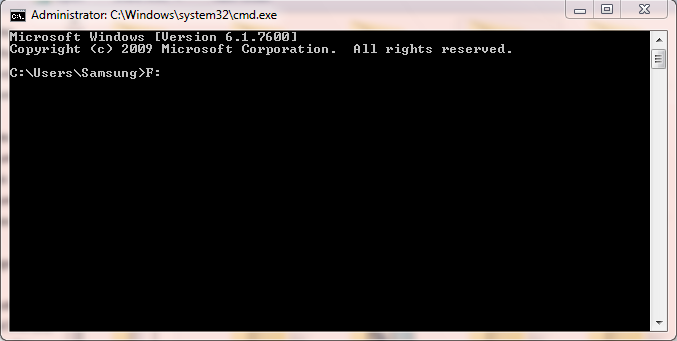
២, សូមចូលទៅក្នុង Drive របស់ Flash របស់លោកអ្នក ដែលកំពុងមានឯកសារ Hide។ បើសិនជា Drive របស់ Flash អ្នកមានអក្សរ F សូមវាយ «F:» (ដោយគ្មានអភណ្ឌរសញ្ញា) បន្ទាប់មកចុច Enter

៣, សូមវាយ អោយដូច «attrib –s –h *.* /s /d» (ដោយគ្មានអភណ្ឌរសញ្ញា)

៤, រង់ចាំបន្តិច ទៅតាមចំនួនឯកសារ ឬ Folder របស់អ្នក

រួចរាល់

អ្នកនឹងទទួលបាន Flash ដែលគ្មាន Hidden File ដូចមុនទៀត។ ហើយចងចាំ មិនត្រូវអោយ Flash ចូលមេរោគទៀតឡើយ។

Unhide Files and Folders after infected by virus (English)

ចុចទីនេះ សំរាប់ភាសាខ្មែរ
Click here for an even easier method

What to expect after eradicating computer virus and experience your files and folder being hidden and you cannot change them easily? Do NOT worry! I’m here to help.

I had only one page of my college assignment to print. I had to go to public printing house since my printer at home just went dead some days ago. Surprisingly, my thumb drive got infected, and everything inside it was set to hidden in a “system file” way. And I’m sure I cannot change it from right-clicking and in Properties. Anyway, I know just what to do with them.


Difficulty level: Fairly easy

Note: This is not way to disinfect your thumb drive; it’s a way to unhide everything in your thumb drive.

Steps:
1- Click Start and type cmd then press Enter
2- Locate your thumb drive letter. If your thumb drive is on F:, type “F:” (without quote) and press Enter

3- Write “attrib –s –h *.* /s /d” (exactly without quote)

4- Sit and wait. It might take from seconds to minutes depending on the number of your files and folder.
5- Done

Remember don’t let your thumb drive got infected again!

Sunday, February 10, 2013

Hippocratic oath & Declaration of Geneva

Hippocratic oath is somehow common among other declaration before uphold a medical profession. Although not compulsory, many have practiced before they are given an official medical title.


It was written in Greek by Hippocrates, yet the current translated version was revised many time already. Below is one of the translated version:
Apollo Physician and Asclepius and Hygieia and Panacea and all the gods and goddesses, making them my witnesses, that I will fulfill according to my ability and judgment this oath and this covenant: To hold him who has taught me this art as equal to my parents and to live my life in partnership with him, and if he is in need of money to give him a share of mine, and to regard his offspring as equal to my brothers in male lineage and to teach them this art - if they desire to learn it - without fee and covenant; to give a share of precepts and oral instruction and all the other learning to my sons and to the sons of him who has instructed me and to pupils who have signed the covenant and have taken an oath according to the medical law, but to no one else. I will apply dietetic measures for the benefit of the sick according to my ability and judgment; I will keep them from harm and injustice. I will neither give a deadly drug to anybody if asked for it, nor will I make a suggestion to this effect. Similarly I will not give to a woman an abortive remedy. In purity and holiness I will guard my life and my art. I will not use the knife, not even on sufferers from stone, but will withdraw in favor of such men as are engaged in this work. Whatever houses I may visit, I will come for the benefit of the sick, remaining free of all intentional injustice, of all mischief and in particular of sexual relations with both female and male persons, be they free or slaves. What I may see or hear in the course of the treatment or even outside of the treatment in regard to the life of men, which on no account one must spread abroad, I will keep to myself holding such things shameful to be spoken about. If I fulfill this path and do not violate it, may it be granted to me to enjoy life and art, being honored with fame among all men for all time to come; if I transgress it and swear falsely. may the opposite of all this be my lot.

Even though being popular in Cambodia, it might be uncommon in other countries since they opt for Declaration of Geneva, as below:
AT THE TIME OF BEING ADMITTED AS A
MEMBER OF THE MEDICAL PROFESSION:
• I SOLEMNLY PLEDGE to consecrate my life to the service of humanity;
• I WILL GIVE to my teachers the respect and gratitude that is their due;
• I WILL PRACTICE my profession with conscience and dignity;
• THE HEALTH OF MY PATIENT will be my first consideration;
• I WILL RESPECT the secrets that are confided in me, even after the patient has died;
• I WILL MAINTAIN by all the means in my power, the honour and the noble traditions of the medical profession;
• MY COLLEAGUES will be my sisters and brothers;
• I WILL NOT PERMIT considerations of age, disease or disability, creed, ethnic origin, gender, nationality, political affiliation, race, sexual orientation, social standing or any other
factor to intervene between my duty and my patient;
• I WILL MAINTAIN the utmost respect for human life;
• I WILL NOT USE my medical knowledge to violate human rights and civil liberties, even under threat;
• I MAKE THESE PROMISES solemnly, freely and upon my honour.

Similar to Hippocratic Oath, Declaration of Geneva was also undergone revision.

So, which one is better according to your view?

LAY Sovannvathana

Monday, January 21, 2013

Lance Armstrong’s Dope: Why EPO?

Photo-Gallery-Lance-Armstrong Lance Armstrong, winner of 7 consecutive Tour de France bicycle race titles, ultimately admitted that his victory was fuelled by drugs i.e.EPO, steroid and even blood transfusion. His career is ended now and all his trophies were stripped, but curiosity might drive us question how that “EPO” makes him an infamous cyclist nobody can beat.

EPO?

EPO, short of Erythropoietin, is a hormone produced mostly by kidney to ultimately create red blood cells (RBC) in red bone marrow, in response to tissue hypoxia (low oxygen in tissue), blood loss or iron therapy (in those who have iron deficiency). It is normally-occurring hormone that keeps our RBC produced. However, EPO, as was used by Lance Armstrong, was artificially harvested, or we can say “Drug”. That EPO drug is epoetin alfa (under trade name Procrit® or Epogen®) which is used therapeutically for people with low red blood counts (such as those received chemotherapy or anemia). On the other hand, EPO comes at a price. Because EPO excessively increases the number of RBC, it could raise viscosity of blood, thus makes it hard for heart to pump (due to high resistance to blood flow), and eventually stroke.

So why does EPO relate to winning?

red-blood-cells

Running, cycling or weight lifting is sport requires strong endurance. Therefore, oxygen delivery to muscle mass is an important key to success, yet it is a limited factor in normal individual. So, to increase athlete’s performance in sport, they need to increase their blood oxygen-carrying capability. But how?

One among other answers to this question lies inside red blood cells. Since RBC transport oxygen, athletes have tried to increase their red blood cell counts known as “Blood Doping” or “Artificially Induced Polycythemia”, as was done by Lance Armstrong. As explained above that EPO might lead to stroke, evidence pointed out that 15 cyclists had died from EPO-related stroke or heart attack in 1980s, which ultimately drove International Olympic Committee to ban the use of epoetin alfa in sport.

EPO, one among other banned substances Lance Armstrong used, was an indicator that his winning was of no meaning but cheat. Additionally, that might give an implication that Lance had not physically pushed himself to the limit, instead he relied on drug that makes no sense to the beautiful definition of “Sport”.

Kenyans are *always* marathon running gold-medalists

Have you ever wondered why those Kenyans always place themselves on top of the list in marathon winner? Of course, their endurance is so strong, and that might explain how they possibly run kilometers non-stop. So, the way we explain it is the way we look at their training ground. Kenya is an African country with highland, specifically more than 2 000 meters above sea level. Because high altitude is scarce of oxygen, their body produces natural EPO to increase their RBCs and even more when they greatly exercise (our body needs more oxygen when exercise). Therefore, their performance and endurance were boosted when they compete in lower land i.e. in Phnom Penh, because their EPO level was higher than athletes trained at lower altitude. Thus, many athletes around the world now become attracted to set up their training camp in Kenya as well.

As epotin alfa is banned, however, it is difficult to detect (high reticulocytes counts) as it is identical to natural Erythropoietin.

Tuesday, January 8, 2013

Reflux Gastro-oesophagienne

Definition

Reflux gastro-oesophagienne est le mouvement de contenu gastrique dans l’œsophage distal.

Pathogenie

- Mécanisme anti-reflux normale : sphincter d’œsophage inferieur (LES), diaphragme crural, anatomie de jonction gastro-œsophagienne.
- Reflux est provoqué par la perte de gradient de pression entre LES et l’estomac.
Cause de l’hypotonie de LES :
- Sans causes apparentes
- Secondaire à myopathie associée avec pseudo-obstruction intestinal chronique, grossesse, tabac, médicament anticholinergique, relaxante de muscle lisse, atteinte chirurgical de LES et œsophagite.
Autre causes :
- Volume gastrique augmentée (post-repas, obstruction de pylore, stase gastrique)
- Contenu gastrique près de jonction gastro-œsophagienne (courber, coucher, hernie hiatale)
- Pression gastrique augmentée (obésité, grossesse, ascite, vêtement serré)
Exposition de l’œsophage à contenu de reflex dépende aux épisodes de reflux, fréquences de reflux, taux de clairance œsophagienne par pesanteur et contraction péristaltisme. La salive aussi joue un rôle dans la neutralisation de l’acidité. Donc, la perturbation de péristaltisme et de salive augmente l’exposition de l’œsophage à l’acidité de contenu de reflux.
Si la contenu gastrique passe à l’œsophage cervicale ou traverse le sphincter supérieur, elle peut entrer le pharynx, larynx, trachée.

Clinique

- Asymptomatique
- Retard (traiter à domicile)
- Pyrosis et régurgitation de contenu gastrique aigre dans la bouche. (plus courant)
- Douleur pseudo-angine ou thoracique
- Dysphagie, perte de poids (à noter l’œsophage de Barrett)
- Manifestation extra-œsophagienne : toux, laryngite, pharyngite…

Diagnostic

- Évidemment clinique
- Documentation de l’atteinte muqueuse :
o Lavement baryté : Plutôt normale. Chercher l’ulcère.
o Œsophagoscopie : chercher l’érosion, ulcère, œsophage de Barrett, adénocarcinome…
o Biopsie muqueuse : chercher l’œsophagite.
o Bernstein test : chercher l’œsophagite.
o Extra-œsophagienne : examen ORL et thoracique
- Quantifier le reflux
o pH métrie : BRAVO. (seulement reflux acidique)

Traitement

- Objective :
o Calmer les symptômes
o Traiter l’œsophagite. (si l’existe)
o Prévenir la complication
1- Modification la mode de vie : pour réduire l’incident de reflux
- Elever tête du lit
- Éviter le repas ou boisson avant se coucher
- Éviter le repas épicé ou graisseux
- Éviter l’alcool et tabac
- Réduire le poids
- Antacide ou inhibiteur H2
2- Symptômes persistés
Sans oesophagite · Antacide.
o (Gaviscon), 10mL 30min après repas et avant de s’endormir
· Médicament promotilité
o Cisapride 10mg. 4f/j
o Metoclopramide 10mg. 4f/j
· Inhibiteur H2
o Cimetidine, 400mg 2f/j
o Ranitidine, 150mg 2/j
o Famotidine, 20mg 2/j
o Nizatidine, 150mg 2/j


Avec oesophagite · Inhibiteur H2 (dose habituelle ou doublée selon la sévérité)
· Inhibiteur H2 + Promotilité
· IPP
o Oméprazole 20mg. Matin
o Lansoprazole 30mg. Matin


- Reflux alkaline ou légèrement acidique : cholestyramine, aluminum hydroxide, ou sucralfate.
3- Chirurgie : Fondoplicature

Complication

- L’oesophagite, ulceration, œsophage de Barrette.

Référence

Fauci, Braunwald et al., Harrison’s Principles of Internal Medicine (Ed. 18, 2012), McGraw-Hill
Robert C. Lowe, M. Michael Wolfe, Cecil Essential of Medicine (Ed. 6th), Elsevier.


Saturday, December 8, 2012

Love Story Kh រឿង​រ៉ាវ​រំភើប

We have a great honor to introduce you with our new blog, vastly dedicated to sad, sweet, romantic, inspirational story in Khmer. We value local content, that's why we make Love Story Kh more Khmer-oriented, but most of all, we value writer either. All posts come with credit so that the best guy deserve a name :)

Check it out,
LoveStoryKh.blogspot.com

Cheer :)

p.s. We have a great Dynamic View theme there too! 


Monday, October 15, 2012

SaidbyVANN would like to deeply express condolence for the loss of the former great king of Cambodia, his majesty, king Norodom Sihanouk, who had fought for independence and many struggles. He also employed his artistic mind to raised Cambodian arts and look throughout his rule.
May he rests in peace,

Friday, September 28, 2012

Turn on PC, Connect modem, Reconnect, Download, and Shutdown – Automatic by itself!

Yay, I had written an article on how to do these same things back couple months ago in this blog. The thing is it was written for WinXP, and well, it sounds too old. We’re going to write this for Windows 7. Cool!
Same as before, my modem carrier provides a fast internet for just a fraction of cents, but problem is this is only for midnight which lasts from 1AM to 5AM. And who’s going to wait and sacrifice their sleep for this? But well, there is way to turn on PC, connect to modem, reconnect if connection is lost, download and shutdown all by computer itself…and you can set yourself at pace, snoring and just let your computer does the work. Alright, let’s get started!
And another tip: Click on picture if you can't see it clearly!!!

Why you need this:
1. Because you don’t want to stay awaked full night for download process.
2. Internet is unstable, so you want your PC to reconnect automatically until it’s connected
3. You want your PC to download at a specified time
4. And when it’s time, you want your PC to power off, without you doing anything.

What you need:
1. Modem, connection profile
2. Keyboard, mouse
3. Patience
4. PC with compatible hardware
5. Ability to type as exactly as I wrote

Difficulty: Moderate
Time: Approx. 15 minutes (with reading)
Demonstrated situation: Free internet from 01:00-05:00h daily.

1- Set up a scheduled power on

We’ll set up an automatic power on for your PC. This stuff needs compatible BIOS (motherboard) to do the job. But don’t worry, if you don’t have, we have an alternative in final section of this article, however, you should proceed to the next section, Setup Connection Profile…just skip this section only. SETUP A SCHEDULED POWER ON is the ONLY feature that is hardware-dependent.
1- Restart your PC
2- Press DEL when your screen says “Press DEL to enter SETUP”. According to different PC configuration, some PC might want you to press F1, F10, or F12.
3- Navigate to “Power” tab which is usually down the screen
4- Select “Everyday”
5- Choose “Time Alarm”. Change the number to your preferred power on time. Since my free internet is from 1AM, so I choose 00:55AM.
6- When you’re done, press “ESC” and it will ask for confirmation, so press YES then.
7- Restart your PC.
Now your PC will power on at your specified time. If your BIOS does not support this, we’ll have alternative in the end of this article.

2- Set up connection profile, reconnect when connection is dropped

We’ll prepare our connection profile and set up a reconnection when internet is disconnected so that no matter what, connection will always remain.
8- Click on network icon on the lower right of task bar and right click on your preferred connection profile. In this case, I right-click on “smart” and choose “Properties”


9- When properties dialogue box appears, click on “Option” tab
10- Uncheck “Prompt for name and password”, “Includes Windows logon domains”, “Prompt for phone number”.
11- Change “Redial attempts” to 99, choose “Time between redial attempts” and in my case, I choose 3 seconds so it reconnects just after connection is lost.
12- Check “Redial if line is dropped” and click “OK”


By doing this, your computer will try to connect to the internet until it get connected. Plus, it will reconnect itself should the connection drops somewhere in the middle of your free internet period.


3- Schedule internet connection

13- Click Start Menu orb, and write “Task Scheduler”. When you find it, open it.
14- On the right sidebar, click on “Create basic task”


15- In “Name”, write “Dial”. Click Next
16- Set schedule behavior. In my case, I choose “Daily” because I want to connect every day. Click Next.
17- Set time to connect to the internet. I choose 1:00AM. Click Next.
18- Choose “Start a program”
19- In the “Program/Script”, write “rasphone -d smart” (without quotation marks) where smart is your connection profile’s name. Change it accordingly. Press Enter.
20- When it ask you to confirm, click “Yes”


21- Click Next, then Finish.


4- Schedule download

Almost every download program on the market has scheduled download feature that enables its user to specify a time to download. Now, we are going to demonstrate on how to schedule download on software called Internet Download Manager. Different software has different way to do it.
Now that I have unfinished downloads queuing up in my list, I want ones to resume at 1:05AM.
22- Open Internet Download Manager.
23- Click “Download” and then “Scheduler”


24- Here are pretty useful options you can set according to your needs. We’re going through just some of these.
I check “Start download at” and specify time to 01:05AM.
I choose “Daily” and check all days in the week.
I check “Stop download at” and set the time to 05:00AM.
There is even an option to shutdown computer once downloads finish. But I’m NOT going to check it because I have two softwares which handle downloads at the same time and I don’t one of them to stop one another. And we still have Scheduled Shutdown anyway.


By the way, you can schedule a program to start using Task Scheduler as we did in Schedule Connection. For example, I pre-set my uTorrent to download once it’s started. So I just have to schedule this program to start at 01:05AM and it will start download from the time it’s launched automatically.


5- Schedule shutdown

We have set every download task already, but we need to power off everything (and our PC) in a specific time so that we save energy, and we disconnect at the same time too! Let’s get to this last step.
25- Start Task Scheduler as in step 13
26- Create Basic task and name it “down”. Click Next.
27- Set it to Daily. Click Next.
28- Set shutdown time. For my case, 05:05AM. Click Next.
29- Choose “Start a program”. Click Next.
30- In Program/Script write “shutdown –f” (without quotation mark). –f is an argument to force all programs to end and shutdown. Click Next.
31- When it asks you, click “Yes”


32- Click Finish.
We’re done!! Congratulation your PC is set to start, connect, download and shutdown at a specific time!!


Cancelling everything

If you want to cancel everything, first go to the Task Scheduler and delete “down” and “dial” tasks. And in your download manager software, cancel scheduled download.


Alternative for incompatible motherboard with automatic power on

If you cannot turn on your PC on a specific time, you might need to turn in on manually and leave it on before you go to bed. But hold on! You don’t have to waste that much amount of energy! You can put your computer to Sleep or Hibernation, and set internet connection to wake your PC up first before it connects. Here’s how:
Considered we have done every step above… except the first section (from step 8-32).
1- Open Task Scheduler as in step 13.
2- Right click on “Dial” task and choose Properties


3- In the “Condition” tab, check “Wake the computer to run this task”.
So that even your PC is in sleep mode, this task will wake your PC to connect to the internet. But it works ONLY in Sleep and Hibernation, and NOT SHUTDOWN. So just put your computer to sleep, and not shutdown before you go to bed.

Surprised? Question? Comment below to get me answer :)


Creative Commons License
Turn on PC, Connect modem, Reconnect, Download, and Shutdown – Automatic by itself! by Sovannvathana is licensed under a Creative Commons Attribution-NonCommercial-NoDerivs 3.0 Unported License.
Based on a work at http://saidbyvann.blogspot.com/2012/09/autointernet.html.

Sunday, September 16, 2012

Funny weekend: Gangnam

It was a Saturday afternoon, and I just watched gangnam full morning. The dance move was funny! And it's a viral video too. So I decided to go for a video shooting with my lil' sis. She was so denying. So I went for her friends who were playing in front of my house. They all showed their interest in the shooting. I showed them the move and they tried to imitate. They went smooth. Just some minutes before the real shooting, my sis came and I asked her to join. Since she saw her friends joined, she decided to do so too lolz.. that's kid! We did the video and went editing the same day. Though we could only make it on SD, but I really enjoy it. I laugh all the way at editing and even on the final video. That's so hilarious to me.